
A stock balance is useful only when it reflects what can actually be supplied. Inventory management systems help businesses record stock, track its movement, and make informed purchasing and fulfillment decisions. Inventory can include raw materials and components, goods in production, and finished products ready for sale.
Keeping an accurate count is essential, but the method used to track stock also affects how quickly a business can identify shortages, excess inventory, or changes in demand. A record that isn’t updated as transactions occur may provide a different picture from one maintained continuously.
This article explains how inventory management works and compares manual, periodic, and perpetual tracking. It also covers demand forecasts, reorder points, safety stock, and software features that support stock decisions. Use these factors to assess an approach against your products, transaction volume, and operating processes.
Key Takeaways
- Use ABC analysis, JIT, and EOQ to frame stock decisions around item importance, timing, and order quantity.
- Choose manual, periodic, or perpetual tracking based on how frequently records need to reflect stock movements.
- Use demand forecasts, reorder points, safety stock, and supplier coordination to manage the effects of changing demand.
- Assess software by the records and workflows it supports, including stock quantities, supplier details, purchase orders, and warehouse locations.
What Is Inventory Management?
Inventory management coordinates raw materials, work in progress, finished goods, and operating supplies. It helps align purchasing and production with customer orders.
ERP and warehouse management systems have different scopes: ERP connects inventory with broader business functions, while warehouse management systems focus on warehouse operations.
Inventory Valuation and Replenishment Methods
ABC analysis, just-in-time (JIT), economic order quantity (EOQ), and first in, first out (FIFO) support stock prioritization, ordering, and movement. ABC analysis groups items by importance, helping teams focus on stock with greater operational impact. JIT schedules supplies to arrive as needed, linking purchasing to production timing. EOQ helps determine an order quantity. FIFO assumes the earliest-received stock is issued or sold first, supporting orderly stock rotation.
Each method addresses a different decision. A manufacturer might use ABC analysis to prioritize component reviews, JIT to coordinate deliveries with production, and EOQ to plan order quantities. FIFO then guides which items leave storage first. The right combination depends on item value, replenishment timing, and how stock moves through operations.
For U.S. tax and accounting records, the Internal Revenue Service says electronic records must meet the same recordkeeping requirements as hard-copy books and records. Businesses must value inventory at the beginning and end of each tax year to determine cost of goods sold. Access controls and transaction histories also support data protection and traceability.
Inventory Tracking Technologies
Barcode scans record stock movements using labeled items, while RFID tags identify items through radio-frequency technology. Both can support consistent transaction records when staff scan or register stock at receiving, during movement, and at dispatch. ERP systems connect inventory data with activities such as purchasing and sales. Warehouse management systems focus on locations, storage, picking, and movement within warehouse operations.
Predictive analytics examines transaction and demand patterns to inform forecasts, purchasing, and replenishment. Reviewing past sales alongside current stock, for example, can help teams anticipate changing demand. Inventory management systems bring tracking records and stock decisions together, but useful results depend on accurate transaction entries and item records.
Manual, periodic, and perpetual inventory systems
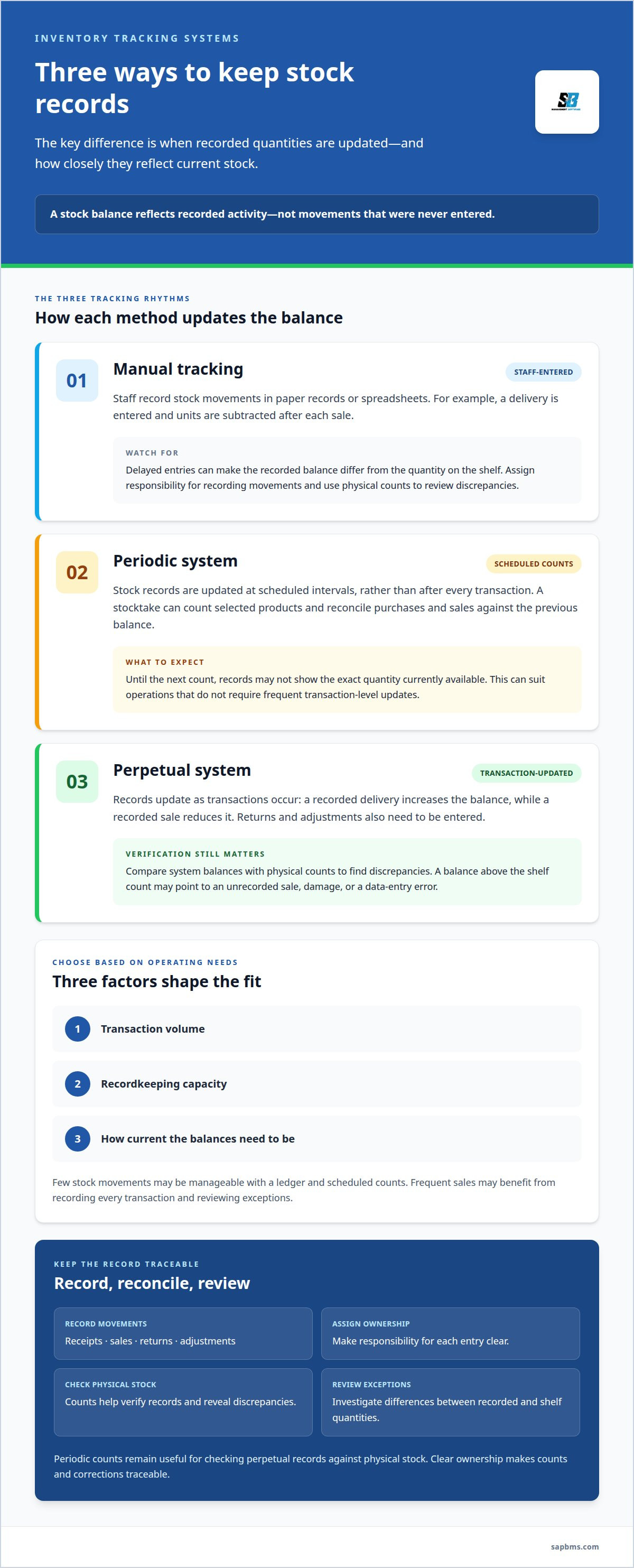
Tracking methods differ in how stock records are created and updated. A small retailer might record receipts and sales in a ledger, count shelves periodically, or update quantities after each transaction.
Manual tracking relies on staff entering each movement into paper records or spreadsheets. A shop employee, for example, can record a delivery and subtract units after each sale. This approach is straightforward, but delayed entries can make recorded balances differ from shelf quantities. Assigning responsibility for recording each receipt, sale, return, and adjustment helps keep records usable. Physical counts can then reveal discrepancies for review.
A periodic inventory system updates stock records at scheduled intervals rather than after every transaction. A retailer might count selected products during a stocktake, then reconcile purchases and sales against the previous balance. Until that count, records may not show the exact quantity currently available. This method can suit operations where frequent transaction-level updates aren’t required. According to the Internal Revenue Service, businesses must value inventory at the beginning and end of each tax year to determine cost of goods sold.
A perpetual system updates inventory records as transactions occur: recording a delivery increases the item balance, while recording a sale reduces it. Returns and stock adjustments also need to be entered, so consistent transaction recording matters. Staff can compare system balances with physical counts to find discrepancies. A recorded balance above the shelf count, for example, may point to an unrecorded sale, damage, or data-entry error. The system reflects recorded activity, not movements that were never entered.
The right operating method depends on transaction volume, recordkeeping capacity, and how current the balances need to be. An operation with few stock movements may manage with a ledger and scheduled counts. A business processing frequent sales may benefit from recording every transaction and reviewing exceptions. Periodic counts still help verify perpetual records against physical stock. In either model, assign responsibility for receipts, sales, returns, adjustments, and reconciliation. Clear ownership makes each count and correction traceable.
Demand forecasting and safety stock
A demand forecast estimates how much stock customers may need over a future period. Start with past sales, then account for known changes, such as seasonal patterns or planned promotions. A retailer, for example, can compare umbrella sales in previous rainy seasons with current orders before adjusting purchases. Forecasts inform decisions, but they do not replace reviewing actual sales and stock movements.
Forecasts inform reorder points, which indicate when replenishment should begin. A useful relationship is: reorder point equals expected demand during supplier lead time plus safety stock. If a supplier takes longer to deliver, account for demand over that longer interval. Updating the calculation when lead times or sales patterns change keeps reorder decisions relevant.
Safety stock is additional inventory held to reduce the impact of unexpected demand or supply delays. Set the buffer by assessing demand variability, supplier reliability, and the cost of a stockout. A business might hold more of a critical component with uncertain replenishment than of an item with steady supply and little impact if it is unavailable.
Forecasting and safety stock work together, but address different uncertainties. The forecast estimates expected demand; the buffer covers variation around that estimate. If sales exceed the forecast, consider whether the change reflects a lasting pattern, a promotion, or a temporary order. Adjust the forecast and reorder point in response to the cause rather than treating every increase as a new baseline.
Supplier coordination adds another input to stock planning. Compare expected delivery dates with actual receipts, and use repeated delays to reassess replenishment assumptions. Inventory optimization also means balancing buffers against excess stock, so review slow-moving items alongside products at risk of shortage. Regularly reviewing sales, open purchase orders, supplier performance, and stock balances connects forecasts with purchasing decisions.
Inventory software features and system selection
Inventory software records quantities, item details, supplier information, and stock movements. Choose features that match transaction workflows, storage locations, and reporting needs.
Software Costs
Software cost is the expense of obtaining and operating an inventory platform. In the United States, pricing depends on the specific requirements and is provided after a quote request. Cost factors include required functions, transaction scope, record volume, and integrations. Compare these with actual workflows, such as purchase-order handling or monitoring stock across warehouses. A feature list alone does not show whether software suits daily operations.
Platform and Software Integrations
Integrations transfer relevant records between inventory software and connected business platforms. An ecommerce connection can update online stock after a sale, while a point-of-sale system can send transaction details to inventory records. Accounting software can receive sales or purchasing data for financial records. For example, a completed sale can reduce available stock and pass transaction information to another system. Consistent item identifiers and records help prevent mismatches between platforms.
System Benefits and Risks
Inventory software can consolidate stock records, monitor quantities across warehouses, and support replenishment decisions. Serial numbers and product batches can improve traceability. Risks include inaccurate records when staff omit transactions, incorrect item data, and poorly coordinated integrations. If a sale recorded in a POS system does not update inventory, for example, online stock may be overstated. Assigning responsibility for transactions and reviewing exceptions helps manage these risks.
Assess the platform against the records staff must maintain: product identifiers, SKUs, quantities, supplier details, purchase orders, and warehouse locations. Check whether it handles raw materials and finished goods, and whether batch or serial tracking suits your products. Then map data flows for ecommerce, POS, and accounting records. Evaluate the workflow with representative transactions, such as receiving a purchase order, recording a sale, and correcting a stock discrepancy.
Review business management system capabilities for integrated inventory tracking, sales execution, and receipt issuance.
SAP Business Management System: SAP Business Management System
SAP Business Management System combines inventory tracking with sales execution and point-of-sale receipt issuance. It also supports professional invoices and quotations, as well as customer and supplier management workflows. Consider it when you need stock records connected to routine sales and commercial administration rather than maintained as an isolated count.
A business can use the platform to oversee inventory while managing sales transactions, issuing receipts, and coordinating customer and supplier records. These connected functions support stock management alongside related business activity. The system suits businesses looking to coordinate these workflows in one business management platform.
Contact SAP Business Management System to discuss your business requirements.
Make Stock Decisions Part of Routine Operations
Set a regular review schedule for the decisions your stock records inform. Assign responsibility for reviewing exceptions, approving adjustments, and recording the reason for each change. This creates a clear operating record and helps teams apply consistent criteria as products, suppliers, and sales patterns change. Start by identifying which decisions need timely stock information, then align responsibilities and review practices with those decisions. This keeps inventory management systems connected to day-to-day operations rather than treating software as a separate task.
For businesses considering a platform to support these processes, SAP Business Management System is a relevant option. Review its business management capabilities in relation to the inventory and sales workflows your organization needs to coordinate. Explore SAP Business Management System as a next step, and continue refining a stock process your team can maintain with clarity and consistency.
Frequently Asked Questions
What is an inventory management system and how does it work?
An inventory management system records stock transactions and maintains a usable view of inventory. Staff can record a delivery against a purchase order, for example, then update the item record when goods arrive. Recording transfers between storage areas helps preserve location information. Inventory management systems organize these records so teams can review discrepancies and plan purchases using transaction history.
What are the main features of inventory management software?
Core features commonly include item records, quantity tracking, supplier details, purchase orders, and warehouse locations. Useful capabilities can also include sales and receipt records, reporting, and controls for reviewing changes. A manager might compare a purchase order with received quantities before approving a stock adjustment. Clear item identifiers and transaction histories make it easier to trace changes to a recorded balance.
What are the best inventory management systems for small businesses in the U.S.?
The right fit depends on a business’s products, transaction processes, and administrative needs, not a universal ranking. A small retailer may prioritize sales, stock records, and point-of-sale receipts; a wholesaler may need purchase orders and supplier records. SAP Business Management System combines inventory tracking with sales execution, receipt issuance, invoices, quotations, and customer and supplier workflows.
How do you choose and implement an inventory management system?
Start by mapping a representative process, such as receiving a supplier delivery and making the items available for sale. Identify who records each transaction, what information staff need, and where errors occur. Clean up item names and identifiers before transferring records. Then test the workflow with staff, compare recorded quantities with physical stock, and document responsibility for ongoing corrections.
What inventory tracking methods and barcode or RFID technologies do systems support?
Systems may support manual entry, transaction-based updates, and physical counts, as well as barcode or RFID identification. A barcode scanner reads a printed label, while RFID equipment reads information from a radio-frequency tag. A receiving team, for example, can scan labeled items as they enter stock. The suitable method depends on product labeling, handling procedures, and how transactions are recorded.
Which inventory management systems support multiple warehouses, locations, and sales channels?
Look for software that keeps stock records separate by warehouse or location and connects sales activity across channels. A transfer between sites should reduce the sending location’s balance and increase the receiving location’s balance. Online and point-of-sale transactions also need to update the relevant stock records. These capabilities help staff see where goods are held and how each sales channel affects availability.