
A spreadsheet can be a practical starting point, but it becomes harder to maintain when daily work depends on shared records and connected processes. Business software for daily operations can centralize information, automate workflows, connect business data, and support collaboration beyond basic spreadsheets. The right choice depends on the work you need to coordinate and the controls required for your business information.
Spreadsheets remain useful for flexible calculations and straightforward tracking, so replacing them is not always the right move. The difference matters when a team needs consistent records, clearer access controls, or connections between operational tasks. This comparison explains what business operations software does and how apps and spreadsheets differ in security, technical skills, and integrations. It also helps you decide when a spreadsheet is sufficient and when a dedicated system can better support daily work.
Key Takeaways
- Use operations software to coordinate records and workflows that are difficult to manage across separate files.
- Keep spreadsheets for straightforward tracking; consider an app when shared processes need more consistent data and workflow controls.
- Compare access controls, technical requirements, and integration needs against the way your team handles business information.
- For inventory, sales, receipts, invoices, quotations, and customer and supplier workflows, consider whether SAP Business Management System fits your operational requirements.
What is Business Operations Management Software?
Business software for daily operations coordinates records, tasks, and handoffs across routine work. It can bring together centralized data, workflow automation, connected systems, and collaboration tools.
Business Management Software Categories
Business management software covers accounting, customer relationship management, inventory, project management, and support applications. Each category addresses a specific operational need. Inventory tools track stock; customer systems organize interactions; project tools assign work. Support applications organize service requests, while team-management features clarify responsibilities and deadlines. These focused tools manage specific functions, unlike platforms that coordinate processes across departments.
Process Management and Workflow Automation
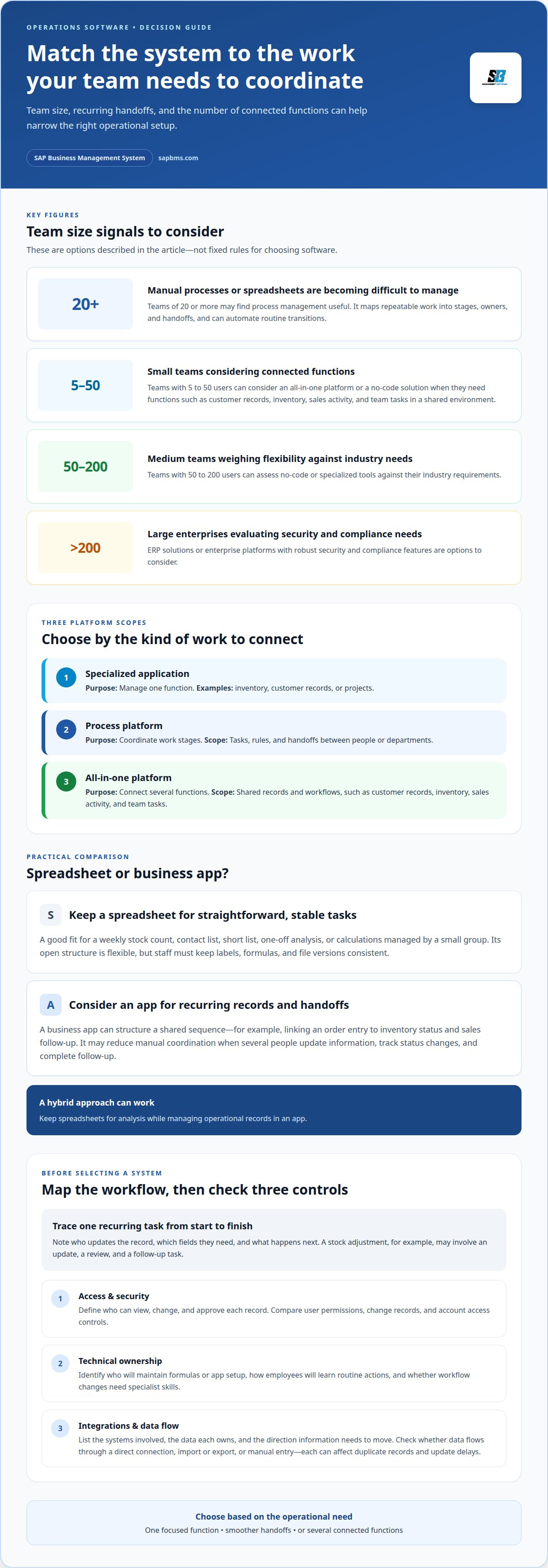
Process management maps repeatable tasks into stages, owners, and handoffs. Workflow automation applies rules to routine transitions, such as sending an approval request after a purchase entry. Unlike inventory or customer systems, these tools focus on how work moves between people and departments. Teams of 20 or more handling manual processes or outgrowing spreadsheets may find this approach useful.
All-in-One Business Platforms
An all-in-one platform brings multiple functions into a shared environment, such as customer records, inventory, sales activity, and team tasks. It covers connected workflows rather than one narrow function. Small teams with 5 to 50 users can consider all-in-one platforms or no-code solutions. Medium teams with 50 to 200 users can assess no-code or specialized tools against industry needs.
| Option | Primary purpose | Typical scope |
|---|---|---|
| Specialized application | Manage one function | Inventory, customer records, or projects |
| Process platform | Coordinate work stages | Tasks, rules, and handoffs |
| All-in-one platform | Connect several functions | Shared records and workflows |
Choose based on whether you need a single operational record, smoother handoffs between teams, or several connected functions.
Business apps versus spreadsheets
Spreadsheets suit defined tasks with stable columns, such as a weekly stock count or contact list. Their open structure lets staff add fields, formulas, and notes without changing systems. That flexibility also means users must keep labels, formulas, and file versions consistent. A duplicated file can leave sales staff working from an outdated customer status.
Business apps organize work around specific records and actions. For example, an order app can link an order entry to inventory status and sales follow-up. An app can structure a shared sequence, while a spreadsheet usually relies on staff to update each relevant cell. Apps suit recurring handoffs; spreadsheets remain practical for one-off analysis, temporary lists, and calculations managed by a small group.
| Option | Best fit | Operational consideration |
|---|---|---|
| Spreadsheet | Stock counts, short lists, calculations | Staff manage updates and versions |
| Business app | Recurring records and handoffs | Processes follow the app’s structure |
Compare the work, not just the interface. If a daily task requires several people to update information, track status changes, and complete follow-up, an app can reduce manual coordination. If one person maintains a short list or tests a calculation, a spreadsheet may be simpler. A hybrid approach can also work: keep spreadsheets for analysis while managing operational records in an app.
Before switching, map one recurring task from start to finish. Note who updates the record, which fields they need, and what happens next. A stock adjustment, for example, may involve an update, a review, and a follow-up task. If those steps rely on separate files or reminders, an app may make the process more consistent.
For a practical reference point, explore business management software for coordinating operational records.
Security, technical skills, and business software integrations
Security begins with deciding who can view, change, and approve each record. For example, a sales employee may need customer details, while inventory adjustments belong to designated staff. Compare how an app assigns user permissions, records changes, and supports account access controls. A spreadsheet shared broadly can make access harder to manage, especially when copies circulate by email. For large enterprises with more than 200 users, ERP solutions or enterprise platforms with robust security and compliance features are options to consider.
Technical requirements vary by system and the processes it supports. A spreadsheet may require staff to maintain formulas, templates, and consistent field names. An app may provide structured forms and workflows, but administrators still need to configure records, roles, and procedures. Before choosing, map the tasks that require technical changes. Identify who will maintain the setup, how employees will learn routine actions, and whether workflow changes require specialist skills.
Integrations determine how information moves between applications. Consider a sales record that should update inventory, or a customer update that must appear in support records. List the systems involved, the data each system owns, and the direction information needs to flow. Then assess whether the proposed app connects those systems directly, uses import or export, or requires manual entry. Each method affects the risk of duplicate records and delays in updates.
Use a short evaluation sequence before committing to a system:
- Define sensitive records, user roles, and approval responsibilities.
- Map the daily tasks employees must complete without technical assistance.
- Document connected applications, shared fields, and the source of each record.
- Test a representative workflow, such as updating a customer record and its related order.
This review helps distinguish a simple tracking need from a broader operational requirement. If role-based access, consistent handoffs, and connected records are essential, assess an app against those criteria. If the work is limited to controlled calculations, a spreadsheet may be easier to maintain.
What features should businesses look for in daily operations software?
Start with the records and tasks employees handle each working day. A suitable system should support the operational sequence, from entering a sales transaction to updating inventory and issuing a receipt. Assess features against actual work rather than a long checklist. For example, identify which records need to connect and who owns each approval.
Review these core capabilities against daily tasks:
- Shared records: Keep customer, supplier, inventory, and sales information organized in usable records.
- Workflow support: Assign tasks and make handoffs clear, such as sending a quotation for review.
- Transaction handling: Record sales, issue receipts, and prepare invoices or quotations as needed.
- Customer and supplier management: Maintain relevant details alongside the workflows that use them.
- Reporting: Give staff a practical way to review operational activity and identify incomplete records.
Next, test whether the system supports the connections your process requires. Trace an example, such as a sale that affects stock and creates a customer record. Check whether information can be entered once and used in related workflows. If staff must retype details between screens or files, note where duplicate entry adds work or creates inconsistent records.
Usability matters because employees need to complete routine tasks accurately. Walk through a representative process, such as preparing a quotation, updating its status, and creating an invoice. Assess field names, required steps, and access permissions. A feature adds value when staff can use it as part of the process, not simply because it appears in a menu.
Use this evaluation sequence to narrow the requirements:
- List recurring transactions and the records they affect.
- Identify staff roles, approval steps, and information access needs.
- Test a complete workflow using a realistic customer or supplier example.
- Record missing functions and manual workarounds before comparing options.
Review your daily operations requirements against these features before selecting a system.
SAP Business Management System: SAP Business Management System
SAP Business Management System supports businesses coordinating inventory, sales, customer records, and supplier workflows. Its functions include inventory tracking, sales execution, point-of-sale receipt issuance, and professional invoices and quotations. These capabilities suit routine operations that rely on connected commercial records rather than separate tracking files.
Consider whether the system’s scope matches the work your team needs to organize. A business handling stock, sales transactions, customer details, and supplier information can use the platform to manage these core operational activities in one place. It also supports quotation and invoice generation for commercial documentation.
Review your recurring processes and identify the records, transactions, and documents you need to manage. If these needs align with the platform’s functions, contact SAP Business Management System to discuss the next step.
Set the Next Operational Step
Make the comparison practical by choosing one recurring workflow to assess. Define the result it must support, who uses it, and which records they need to maintain. Then agree on practical criteria, such as fewer duplicate entries, clearer ownership, or easier review of current information. This keeps the decision grounded in actual work rather than feature lists.
Use those criteria to decide whether your spreadsheets remain adequate or business software for daily operations would better support the workflow. Keep the scope focused: document the current process, identify its main friction point, and state what a workable change should improve. This gives your team a practical basis for evaluating options without adding unnecessary complexity.
If your operational needs align with its scope, consider SAP Business Management System as a next step. For a direct discussion of the system, contact SAP Business Management System. A clear decision process helps you move forward with confidence.
Frequently Asked Questions
What types of business software are used for daily operations?
Common types include ERP, CRM, accounting, inventory, project management, and point-of-sale software. Match the category to the transaction you need to control: an online retailer may prioritize stock and order records, while a consulting firm may focus on client engagements and time tracking. If several functions depend on the same customer or order record, assess a connected platform rather than adding another isolated tool.
What are the best business operations software platforms for small businesses in 2026?
The best fit is a platform that supports a small business’s essential workflows without creating unnecessary administration. Start by listing the records staff maintain, then test a representative task, such as processing an order from entry through follow-up. Compare user permissions, reporting, and data export. A platform that handles these needs clearly is a better fit than one selected by feature count alone.
How do ERP, CRM, project management, and accounting software differ?
ERP software coordinates multiple business functions and shared records. CRM software organizes customer interactions and sales activity. Project management software assigns work, deadlines, and progress, while accounting software records and organizes financial transactions. For example, a customer inquiry may be tracked in a CRM, assigned as project work, and later recorded in accounting software. Choose according to the main work the system must control.
How much does business operations software cost in the United States?
Software costs depend on the licensing structure, user requirements, included functions, integrations, and support. Compare the full scope rather than a headline rate, and account for any additional systems needed to complete the workflow. For a particular system, the price depends on the case and is provided after a quote request. Factors include selected functions, user requirements, and project scope.
What are the best free or low-cost business software tools for daily operations?
For simple internal tracking, a spreadsheet can be a practical starting point. For repeatable tasks, compare entry-level apps by checking whether they support the records, user access, and data exports your workflow needs. For example, a small team managing customer requests should test how an app assigns ownership and retains request history before relying on a free tool.
Which business operations software integrates with payroll, accounting, and ecommerce tools?
Integration depends on the systems involved and the information that needs to move between them. Before choosing a platform, list the payroll, accounting, and ecommerce records involved, such as order totals, customer details, or sales summaries. Then establish whether information transfers automatically, through import and export, or through manual entry. Test a complete transaction to identify gaps and duplicate records.
