
For a small or midsize business, inventory system software keeps a working record of stock quantities, orders, sales, deliveries, and movements between locations. It helps teams receive and issue stock, monitor reorder points, and make replenishment decisions using current records instead of disconnected counts.
The core function is consistent, but systems vary in how they handle item identification, purchasing, sales, production, and connected applications. Barcodes, serial numbers, and similar identifiers link stock records to the transactions that change them.
This guide explains what IT inventory management software does and how a typical system works, then compares ten options using practical criteria for small and midsize businesses. It also covers connections with sales, purchasing, manufacturing, accounting, and other apps, helping you assess how each option fits your existing processes and data flows.
Key Takeaways
- Map how stock receipts, sales, transfers, and adjustments change inventory records before comparing software.
- Assess which connections matter most across sales, purchasing, manufacturing, accounting, and quality workflows.
- Match system functions to your operating model, including item identification, replenishment, and movement between locations.
- Consider whether SAP Business Management System’s inventory, sales, point-of-sale, invoicing, quotation, customer, and supplier tools fit your operational requirements.
Integration with sales, manufacturing, purchasing, accounting, and quality apps
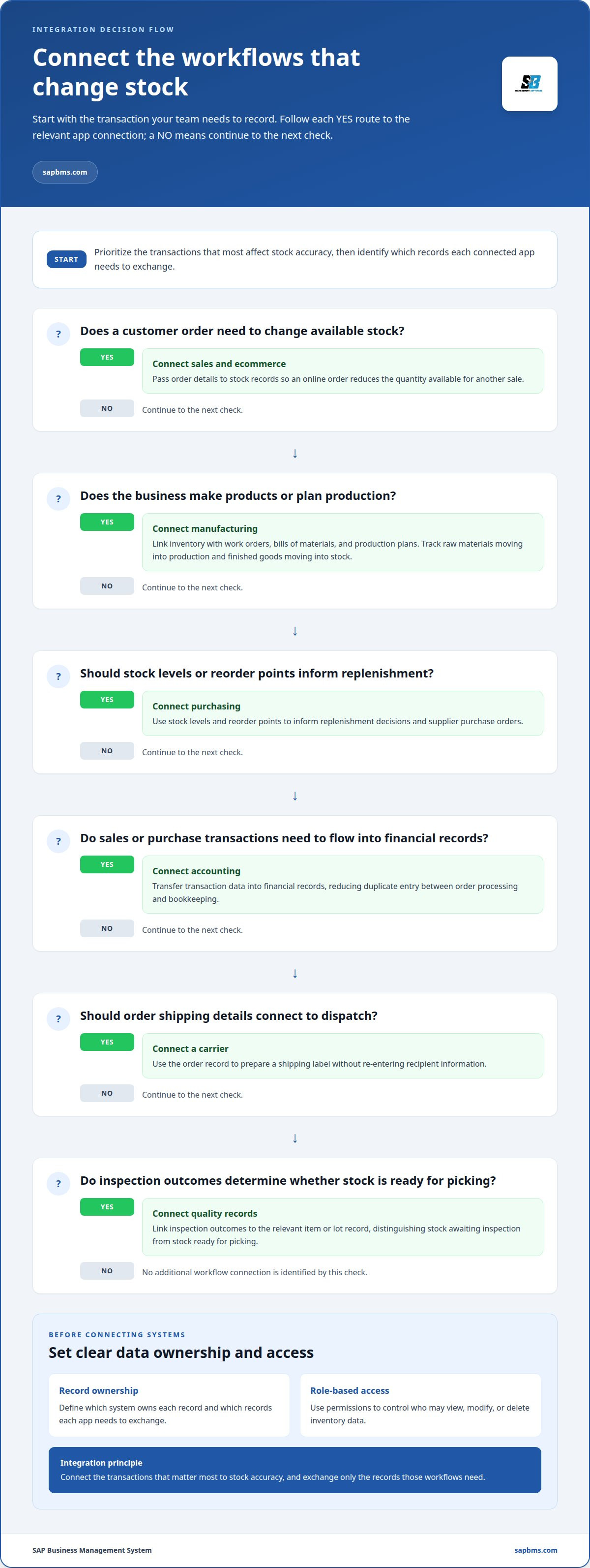
Features should connect stock records with sales, purchasing, manufacturing, accounting, shipping, and quality workflows. For example, a sale can reduce available stock, while a reorder point can prompt replenishment.
Sales, Ecommerce, and Accounting Connections
Sales and ecommerce integrations pass order details to stock records, so an online order reduces the quantity available for another sale. Accounting connections can transfer transaction data into financial records, reducing duplicate entry between order processing and bookkeeping. Unlike manufacturing links, these connections focus on customer orders, sales transactions, and related accounting entries.
Manufacturing and Purchasing Connections
Manufacturing integrations can connect inventory with work orders, bills of materials, and production plans. Purchasing links use stock levels and reorder points to inform replenishment decisions. These workflows differ from sales connections: they focus on material requirements and supplier orders, including the movement of raw materials into production and finished goods into stock.
| Integration option | Records connected | Primary distinction |
|---|---|---|
| Sales and ecommerce | Orders and stock quantities | Customer demand |
| Manufacturing | Work orders and bills of materials | Production requirements |
| Purchasing | Stock levels and purchase orders | Replenishment |
| Accounting | Sales and purchase transactions | Financial records |
Carrier integration connects an order’s shipping details to the dispatch process. For example, staff can use the order record to prepare a shipping label without re-entering recipient information.
For quality assurance, link inspection outcomes to the relevant item or lot record. This lets staff distinguish stock awaiting inspection from stock ready for picking. During integration, define which system owns each record and restrict access through role-based authentication. Permissions can control who may view, modify, or delete inventory data.
Choose integrations by prioritizing the transactions that most affect stock accuracy, then identify which records each app needs to exchange.
What is IT Inventory Management software?
Inventory management software maintains records of stock levels, orders, deliveries, and movements. Staff use those records to decide what is available, where it is held, and when replenishment should begin.
Tracking Stock Movements and Replenishment
Each receipt, issue, transfer, or adjustment changes an item’s recorded balance. For example, recording a supplier delivery increases stock at the receiving warehouse, while issuing components to production reduces available raw materials.
A reorder point sets the stock level that prompts replenishment. Teams can compare current quantities with that threshold, then decide whether to buy more or review upcoming demand. This function guides the next stock action rather than simply showing where goods are stored.
Stock Control and Inventory Visibility
Stock control uses item records to distinguish available, reserved, damaged, or otherwise restricted goods. A barcode scan links a physical item to its record, helping staff capture actions during receiving, picking, and counting.
Organizing records by item and location makes stock visible. A manager can compare warehouse balances, spot a discrepancy, and review the transactions that changed the quantity. The United States Congress states that inventory records should accurately reflect transactions and asset dispositions in reasonable detail.
Real-Time Inventory Tracking
Real-time tracking means the record updates when staff enter a transaction, such as a sale, receipt, or warehouse transfer. Its value depends on capturing each action when it happens; delayed entry can leave displayed levels out of step with physical stock.
For example, scanning an item during picking can update its available quantity before another order is allocated. Analytics can use recorded movements to reveal stock-usage patterns and support replenishment decisions. These tools differ from periodic counting, which checks physical quantities at scheduled intervals.
To assess the fit, trace one item from receipt through storage, sale, and replenishment, then identify where staff record each action. Integrated business operations can connect inventory records with related commercial workflows.
Inventory management for small and mid-size businesses
For a smaller operation, inventory management connects stock records with supply chain activity, from supplier receipt to customer order. The right process depends on what the business stores, sells, or produces.
Examples by Business Type
A retailer can use inventory management software to compare stock on hand with sales orders across stores and warehouses. A distributor can track goods moving between suppliers, warehouses, and retail sites, recording each receipt, pick, pack, and shipment.
Manufacturers have different requirements: material planning links raw materials and work in progress to production activity and finished goods. Demand forecasting can draw on historical sales, seasonal trends, and market patterns to estimate future stock needs. These examples show why workflows should reflect the type of business, not just its item count.
Benefits and Challenges
Systematic records help businesses identify shortages, excess stock, and replenishment needs. Retailers face inventory distortion, estimated to have cost the sector $1.7 trillion in 2024. Clear records can help teams locate discrepancies and make purchasing decisions using recorded stock and order activity.
The challenge is maintaining accurate inputs across staff, sites, and transactions. A manual count can reveal a mismatch, but the team still needs to record the adjustment and identify its cause. Late entries for sales, receipts, or transfers can make the system’s view differ from physical stock.
Choose a method that matches the work. A warehouse team might scan item labels during receiving and picking, then reconcile records through physical counts. A QR code can identify an item for scanning; consistent labels and transaction procedures make scans useful across locations.
For supply chain control, map each handoff: supplier delivery, receiving, storage, order allocation, and dispatch. At each step, define who records the transaction and which stock status changes. Manufacturing teams can also connect material requirements to bills of materials and production activity, so purchasing decisions reflect planned use.
Inventory system definitions and operation
An inventory system maintains records of items, quantities, orders, deliveries, and stock movements. Its core purpose is to provide a consistent basis for operational decisions, from locating a product to preparing a stock report.
To set up a system, first define its records: item identifiers, descriptions, locations, and transaction types. Inventory systems commonly identify items with barcodes, serial numbers, lot numbers, or similar markers. For example, a lot number distinguishes one batch from another during receiving and stock review.
Next, map the processes that change those records. A supplier receipt increases the quantity at a warehouse; a transfer changes its location; a sale reduces available stock. Recording each action against the right item and location helps keep records aligned with actual operations.
Hardware and data depend on the workflow. A team might use a computer to manage records and a mobile device to scan barcodes during warehouse receiving. Item identifiers, location details, quantities, and transaction records give the system the information it needs to track stock.
Inventory software can be installed locally or delivered as software as a service. In either model, define who enters receipts, adjustments, transfers, and sales, then establish how staff correct errors. Clear ownership supports consistent processes and makes reports easier to interpret.
For a practical setup test, trace one item from purchase receipt through storage, order allocation, and dispatch. At each stage, identify the responsible action and record it against the item. Compare the system record with physical stock, then refine any process that creates a mismatch. This gives teams a concrete way to evaluate whether their inventory system software supports daily operations and improves recordkeeping.
SAP Business Management System: SAP Business Management System
SAP Business Management System brings inventory tracking, sales execution, and point-of-sale receipt issuance into one business platform. It also supports professional invoices and quotations, as well as customer and supplier management workflows.
Consider it when you want stock records alongside everyday sales and purchasing administration. For example, a business can use its inventory tools to track goods while handling sales transactions, preparing quotations, and maintaining supplier records. This gives teams a shared operational context instead of treating inventory as an isolated task.
Review how these functions fit your current processes, including how staff record stock and handle sales, customer, and supplier workflows. To discuss SAP Business Management System, contact the team or visit sapbms.com.
Set a Clear Next Step for Inventory Operations
Before selecting inventory system software, document the decisions the system must support and assign an owner to each process. Record where stock data starts, who updates it, and which teams rely on it. This gives your evaluation a practical basis and helps separate essential requirements from optional functions.
Use that process map to identify the operational gap with the greatest impact on daily work. It might be disconnected stock and sales records, unclear purchasing workflows, or difficulty coordinating customer and supplier information. Setting a priority makes it easier to assess how a business platform fits your needs, rather than treating software selection as an isolated technology decision.
SAP Business Management System is an option for businesses assessing an integrated operations platform. Discuss your requirements and next steps directly with the team.
Contact SAP Business Management System to continue the conversation and move your evaluation forward.
Frequently Asked Questions
What is inventory management software and how does it work?
Inventory management software gives a business a digital record of stock and its related transactions. Staff enter or scan activity, while the system updates records used for operational decisions. For example, a supervisor can investigate an unexpected balance by reviewing receipt, transfer, and adjustment entries. Reliable results require consistent item identifiers, accurate transaction details, and clear responsibility for correcting errors.
What is the best inventory software for small businesses in 2026?
There is no single best choice for every small business; the right option fits its daily workflows. Compare how each system handles sales channels, purchasing, locations, and reporting needs. A retailer with a checkout counter may prioritize point-of-sale coordination, while a maker may need production records. SAP Business Management System is one platform to consider for inventory and sales operations.
How do inventory systems compare with ERP and point-of-sale software?
An inventory system focuses on stock records and movement; point-of-sale software records checkout activity, while ERP coordinates connected business functions. These boundaries can overlap: a platform may combine inventory tracking with sales execution and point-of-sale receipts. For example, a store using separate checkout and stock tools needs a process to reconcile sales with inventory. Compare systems by identifying which transactions they manage and which records they share.
How do you choose and implement an inventory system?
Start by listing required workflows, users, locations, and records, then compare options against that list. Before migration, remove duplicate item entries and agree on naming conventions, units, and location labels. Assign an owner for data decisions and transaction procedures. During rollout, test representative transactions, such as a return or damaged-goods adjustment, then reconcile the results with physical stock before expanding use.
What are the risks and limitations of inventory management software?
Software cannot fix incomplete or inaccurate inputs on its own. Duplicate item records, late transaction entry, and inconsistent staff procedures can produce unreliable reports. Integration errors can also make records in connected applications disagree. Reduce these risks by assigning responsibility for item data, documenting correction procedures, and routinely reviewing exceptions. A system’s value depends on how well its records and workflows reflect actual operations.
What security and compliance requirements apply to inventory software in the United States?
Requirements depend on the organization’s activities and applicable obligations; inventory software alone does not establish compliance. The Sarbanes-Oxley Act is a consideration for organizations subject to its requirements. Operationally, define who may view or change records, how transaction evidence is retained, and how errors are corrected. Document these controls and align system access with staff responsibilities instead of relying on shared accounts.


